
170 vs 128 DMX Pixels: Plan RGB vs RGBW for Installers
170 vs 128 DMX Pixels: Plan RGB vs RGBW for Installers
RGBW is the safer default whenever you need real white light alongside color effects; RGB is fine when color is the only job. The difference comes down to one extra emitter: RGBW adds a dedicated white diode instead of faking white by blending red, green, and blue. This changes your CRI, your controller math (three channels vs. four on DMX512), and your long-term costs. Many lighting companies specify RGBW on permanent roofline jobs for this reason.
TL;DR:
- RGBW fixtures generally deliver higher brightness and better color rendering for white scenes compared to RGB, especially when used daily for white light.
- Installing RGBW systems reduces power consumption and heat output over time, which can extend fixture lifespan in white-heavy applications.
- Controllers must explicitly support the fourth (white) channel; using an RGB controller with RGBW fixtures often results in no white output or unpredictable colors.
- RGB fixtures are cheaper upfront but tend to incur higher energy and maintenance costs if white lighting is frequently used over the long term.
- In permanent installations where white light is needed every night, RGBW provides more consistent quality and longevity, making it the preferred choice.
RGB vs RGBW at a Glance
Before you sign off on a spec sheet or call an installer, run through this checklist. It covers the four things that actually change your outcome: channel count, white quality, use case, and cost direction.
- Channels: RGB runs three channels per pixel. RGBW runs four. RGBCW or RGBWW setups add a fifth or sixth channel for tunable white.
- White quality: RGB approximates white by mixing red, green, and blue. RGBW produces white from a dedicated emitter, which usually reads cleaner and brighter.
- Best for: RGB suits short-term, color-only displays. RGBW suits anything running white light daily, like a roofline, a facade, or a retail storefront.
- Controller needs: RGB works with basic 3-channel controllers. RGBW needs a controller and driver that both support the fourth white channel, or you lose it.
- Cost direction: RGB usually costs less upfront. RGBW tends to cost less over the life of the fixture if you run white scenes often, since dedicated white channels draw less power for white output.
How Does RGB Lighting Actually Produce Color?
RGB lighting relies on additive color mixing. Three separate emitters, red, green, and blue, sit close together in a single package or fixture. Your eye blends the light from all three into a single perceived color. White is not a real “channel” in RGB. It is an illusion created by driving red, green, and blue at roughly equal, high intensity.
Most RGB drivers control brightness through pulse width modulation, or PWM, which switches each LED on and off faster than the eye can detect and varies the duty cycle to dim it. The catch: luminous intensity does not scale in a straight line with current, so a controller has to compensate or you get color shift as you dim.
This is also where RGB runs into trouble for anything beyond decorative color. Because “white” is really a blend of three narrow-spectrum peaks rather than a full spread of wavelengths, the spectral power distribution has gaps. Those gaps show up as poor rendering of skin tones, pastels, and neutral surfaces. It is the reason mixed RGB white so often reads as slightly pink, green, or blue instead of clean white, and why CRI scores for RGB white tend to sit noticeably lower than for a fixture with a real white diode.
What Makes RGBW Different at the Hardware Level?
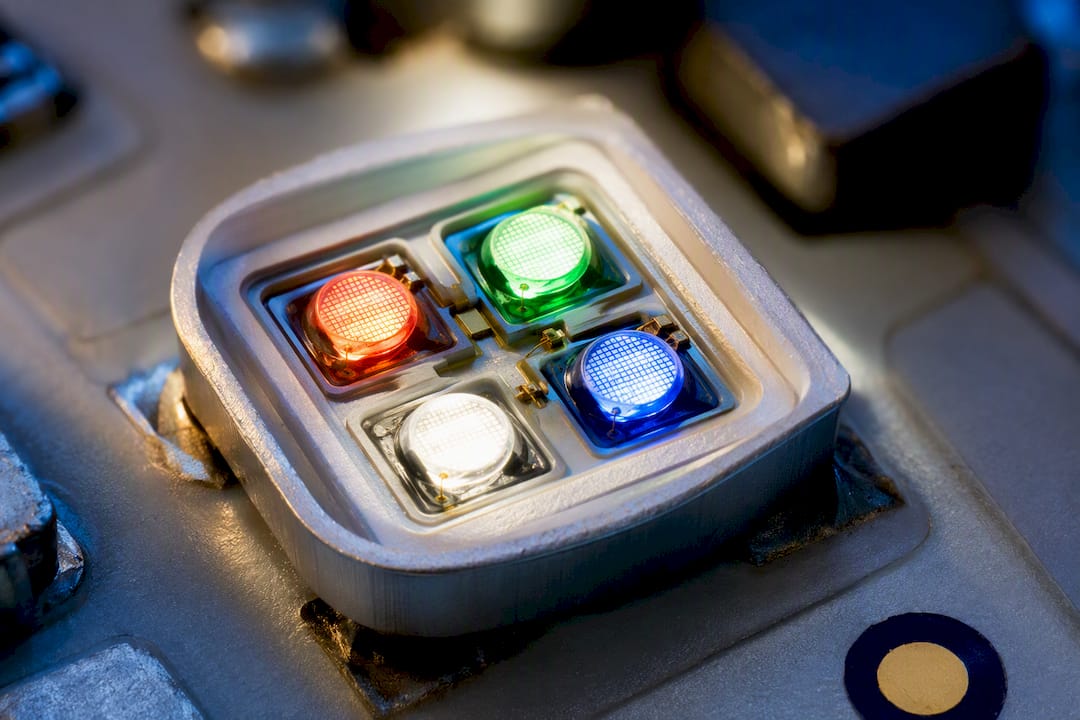
RGBW solves the white problem by adding a fourth emitter built specifically to produce white light, rather than asking red, green, and blue to fake it. Manufacturers implement this two main ways: as a separate white diode sitting next to the RGB emitters, or as a 4-in-1 quad chip that packs all four colors into a single package. Some fixtures go further with RGBWW or RGBCW configurations, adding both a warm white and a cool white emitter so you can tune color temperature independently of color mode.
The chip choice matters more than most spec sheets admit. Quad chips and discrete white diodes mix light differently at close range, which affects how colors blend right at the fixture versus several feet away. A poorly designed quad chip can show visible color fringing up close, while a well-diffused discrete setup blends cleanly. That is why optical design choices, diffusers, lens shape, beam angle, matter as much as the chip spec itself.
The payoff is efficiency. Because RGBW does not need three channels running simultaneously to fake white, the dedicated white emitter typically produces more usable brightness for white scenes while drawing less power. That translates into more lumens per watt when the fixture is in white mode, and less heat generated to hit the same white brightness.
Do CRI, Cost, and Lifespan Actually Favor RGBW?
Once you get past the spec sheet, three things determine whether a homeowner or venue manager is happy with the install: how the white looks, what it costs to run, and how long it lasts before something needs replacing.
White quality is where the gap is widest. RGB-mixed white commonly renders poorly on skin tones and light, neutral colors because its spectrum has three narrow spikes instead of a broad curve. Adding a dedicated white LED typically raises CRI and improves how white actually looks, which is why stage and camera work almost always specifies RGBW or better.
Quick stat: RGBW fixtures generally deliver higher brightness for white scenes and lower power draw in white mode compared to RGB strips producing an equivalent white output, and tend to hold up longer under white-heavy daily use.
Here is how the trade-offs break down for buyers:
- Perceived quality: RGBW wins for whites, pastels, and skin tones. RGB wins for saturated, pure colors, since it is not diluted by a white channel.
- Power draw: RGB needs multiple channels active at once for white, pulling more current. RGBW’s dedicated white emitter is more efficient for the same white brightness.
- Heat and decay: Running three channels hard to fake white generates more heat per lumen of white output, which can accelerate LED decay over years of daily use.
- Upfront cost: RGB fixtures and strips are usually cheaper to buy.
- Total cost of ownership: RGBW tends to cost less over several years of daily white use, thanks to lower power draw and typically longer service life in that mode.
If your project runs white light every night, that lifespan gap adds up fast. If it only runs color a few weeks a year, the upfront savings on RGB might win out.
What Should You Check on Controllers Before You Buy?
Channel count changes everything about how you plan a control system. RGB needs three channels per pixel. RGBW needs four, and RGBWW or RGBCW variants need five or six. That difference isn’t just academic. It changes how many pixels you can fit on a single control line.
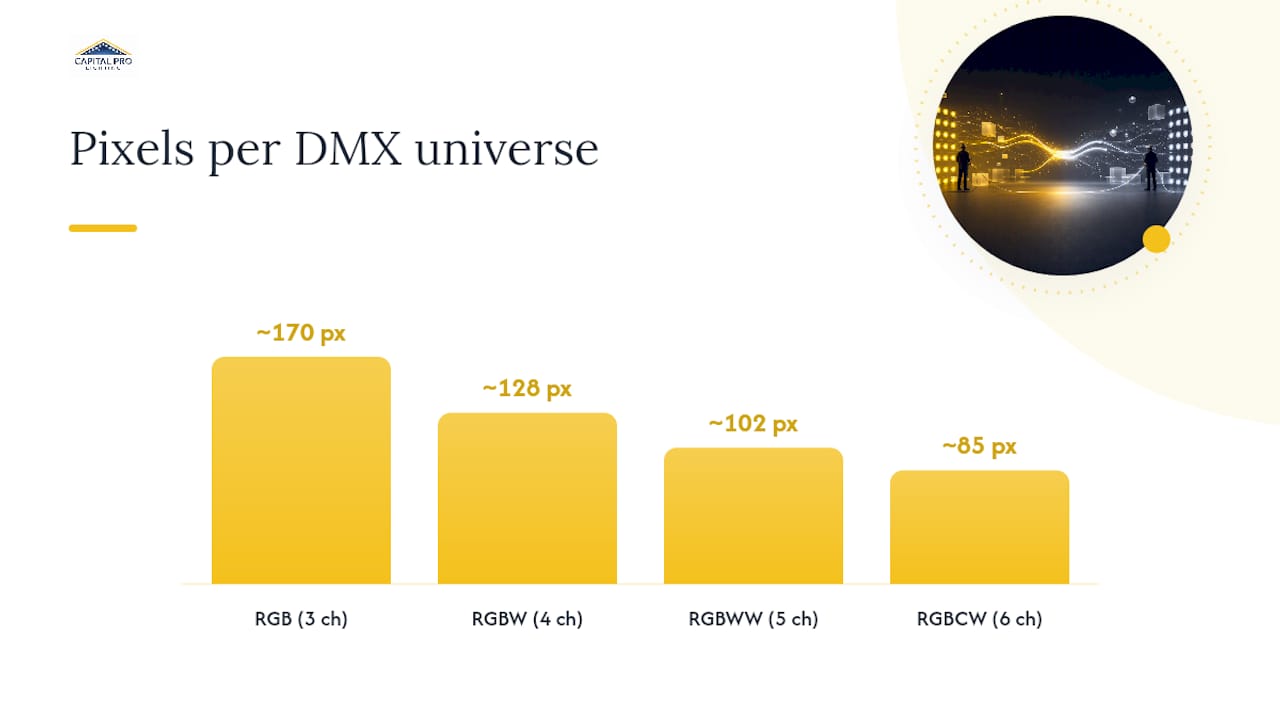
On DMX512, a single universe carries roughly 170 basic RGB pixels at three channels each, versus around 128 RGBW pixels at four channels each. Underestimate that math on a large facade and you will end up short on universes mid-install.
Before committing to a controller, run through this:
- Confirm the controller and driver both explicitly support a fourth (white) channel, not just three.
- Check the firmware profile matches your fixture’s channel order. Mismatched mapping turns white scenes into odd color casts.
- Verify how many pixels or fixtures fit per universe or output at your channel count, then plan addressing before wiring, not after.
- Ask whether the system supports RGBIC or other addressable pixel modes if you want multiple colors moving across a single run.
Pro Tip: Always request the controller’s channel map in writing before installation day. A four-channel RGBW fixture wired to a three-channel profile will simply drop the white channel, and you won’t notice until the first time you try to run a clean white scene.
Which Projects Actually Need RGBW vs RGB?
Match the technology to how the lighting gets used, not just what looks good in a showroom demo.
- Purely decorative, short-term displays: RGB is fine. Think seasonal accent lighting or fast, saturated color chases where nobody expects a clean white.
- Stage and event lighting with fast color changes: RGB fixtures still earn their place for saturated, moving color effects, especially when budget rules per-fixture cost.
- Permanent residential roofline and facade lighting: RGBW is the better call. Architectural guidance consistently flags choosing RGB for a facade used year-round as a common mistake, since the fixture ends up running white light most nights of the year.
- Retail and camera-facing installs: RGBW or better, since accurate white rendering affects how merchandise or a broadcast subject actually looks.
- Multi-use venues: A hybrid approach often works best. Combining RGB fixtures for saturated color effects with RGBW fixtures for key white lighting covers both needs without overpaying for RGBW everywhere.
When mixing fixture types on one property, calibrate white output across all of them before final install. Two “white” fixtures from different product lines rarely match on the first try.
What Should You Verify Before Installation Day?
Do not take a manufacturer’s white claim at face value. Ask for the paperwork, and ask before the fixtures ship.
Request an IES file for the beam pattern, an SPD plot to see the actual spectral output, and stated CRI or TLCI values for the white mode specifically, not just an averaged number. If the vendor has LM-80 test data or third-party lab results on lumen depreciation, ask for it too. Specifying these documents up front, along with a target CCT and minimum CRI, catches problems before installation instead of after.
On the electrical side, confirm your driver and power supply are sized for worst-case load, meaning RGB and white channels running simultaneously at full brightness, not just an average draw. Long cable runs lose voltage, which shows up as color shift at the far end of a roofline before it shows up as dimming.
Finally, sample before you commit to a full run. Mount a few fixtures, run them through white and color modes side by side, and check the mixing distance. A quad chip that blends cleanly at ten feet can show visible color separation at three.
Can Standard RGB Controllers Run RGBW Fixtures?
Not fully, and this trips up more installers than it should. A standard three-channel RGB controller sends red, green, and blue signals only. Plug it into an RGBW fixture and the white diode simply never fires. You get color modes, but no white output, on hardware that is fully capable of producing one.
The reverse causes a different failure. Feed an RGBW controller’s four-channel signal into an RGB-only fixture, and the fourth channel has nowhere to go. Depending on the wiring, that stray signal either gets ignored or, on some cheaper drivers, causes flickering or unexpected behavior on the blue channel since pin assignments sometimes get crossed.
Firmware profiles compound the problem. Even when a controller technically supports four channels, its channel order (RGBW versus WRGB versus GRBW, for instance) has to match the fixture’s actual wiring. Mismatched order does not always throw an error. It just produces the wrong colors, often subtly enough that installers blame the fixture instead of the mapping.
The practical fix is simple but often skipped: confirm channel count and channel order match on both ends of the connection before wiring a single run. This matters even more on retrofit jobs, where an existing RGB controller gets reused for a new RGBW fixture to save money. That reuse works sometimes. It also explains a large share of the “why won’t my white channel turn on” service calls installers field after a DIY upgrade.
What’s Actually Different Inside an RGB vs RGBW Chip?
The hardware gap starts at the package level. A standard RGB LED package holds three dies, red, green, and blue, wired to be driven independently. RGBW packages hold four dies in one of two layouts: a true 4-in-1 chip with all four color dies packed into a single surface-mount package, or a design that places a separate white LED next to a standard RGB emitter.
That layout choice changes more than you’d expect. A 4-in-1 chip mixes colors at a shorter distance because the dies sit fractions of a millimeter apart, which generally produces smoother blending in tight fixtures like linear strip lighting. A discrete white-LED-plus-RGB layout needs a bit more distance or diffusion to mix cleanly, but it often allows for a wider range of white LED options, letting manufacturers dial in a specific color temperature rather than whatever the quad chip manufacturer offers.
Thermal design also differs. Four dies in one small package generate more concentrated heat than three, which pushes RGBW package design toward better substrate materials and heat sinking than a comparable RGB package needs. Skimp on that thermal path and you get faster lumen decay on the white channel specifically, since white dies in cheaper RGBW packages are sometimes the first component to degrade under sustained heat.
None of this shows up on a basic spec sheet. It shows up in how consistent the color looks after a year of runtime, and it is exactly why chip type and mixing behavior deserve real scrutiny before you commit to a large order.
Why Won’t My RGBW Fixture Show True White?
This is the single most common RGBW complaint, and it almost always traces back to one of three causes. First, check the controller and firmware mapping. If the white channel is not properly addressed, the fixture will run RGB colors fine but never activate the fourth diode, leaving you stuck faking white through color mixing on hardware built to avoid exactly that.
Second, look at simultaneous load behavior. Some cheaper RGBW drivers cannot run all four channels at full brightness at once without brownout or thermal throttling, which shows up as a white scene that looks dimmer or slightly tinted compared to running color modes alone. This is a driver sizing problem, not a fixture defect, and it is why confirming simultaneous RGB and white load capacity before purchase matters more than most buyers realize.
Third, watch for visible color fringing at close range, especially on quad-chip fixtures. If you can see faint red, green, or blue edges around what should be a clean white beam, the fixture’s near-field mixing distance is too short for its mounting position. The fix is usually optical, adding a diffuser, adjusting mounting distance, or swapping to a fixture with a different chip layout, rather than a wiring issue.
A slower but subtler issue: color drift over months of use, where white output shifts warmer or cooler than the original calibration. This points to uneven LED decay across the four dies, often because the white die runs hotter than the color dies and ages faster. Regular firmware recalibration on smart systems can mask this for a while, but it is worth flagging during any annual service check rather than waiting for a customer complaint.
How Much More Power Does RGB Use Than RGBW?
The efficiency gap between the two systems is real, and it is biggest exactly where most permanent installations spend most of their runtime: producing white light. RGB has to fire red, green, and blue channels simultaneously near full output just to approximate white, which means three sets of diodes drawing current at once for a single perceived color. RGBW reaches the same white brightness with one dedicated emitter, which generally draws less power and produces more usable brightness per watt in white mode.
The gap narrows or disappears in pure color modes. When an RGBW fixture displays a saturated red or blue, it is running the same three color dies as an RGB fixture, plus a dormant white die drawing nothing. Power draw between the two systems in color-only mode is close to identical.
Where this plays out over a full year is in duty cycle. A residential roofline lit nightly for landscape lighting or curb appeal spends the overwhelming majority of its runtime in white or warm-white mode, with color reserved for holidays and special occasions. That usage pattern is exactly where RGBW’s efficiency advantage compounds, night after night, across an entire lighting season rather than showing up only during the few weeks color modes actually run, making it critical to consider elements like white interior finishes for best lighting results.
Heat output tracks power draw closely, since nearly all the electrical energy an LED does not convert to light comes off as heat. Lower power draw for white output means less thermal stress on the fixture, which feeds directly into the lifespan differences covered earlier in this article.
Which System Needs More Maintenance Over Time?
Failure modes differ between the two systems in ways that matter for anyone budgeting for service calls, not just purchase price.
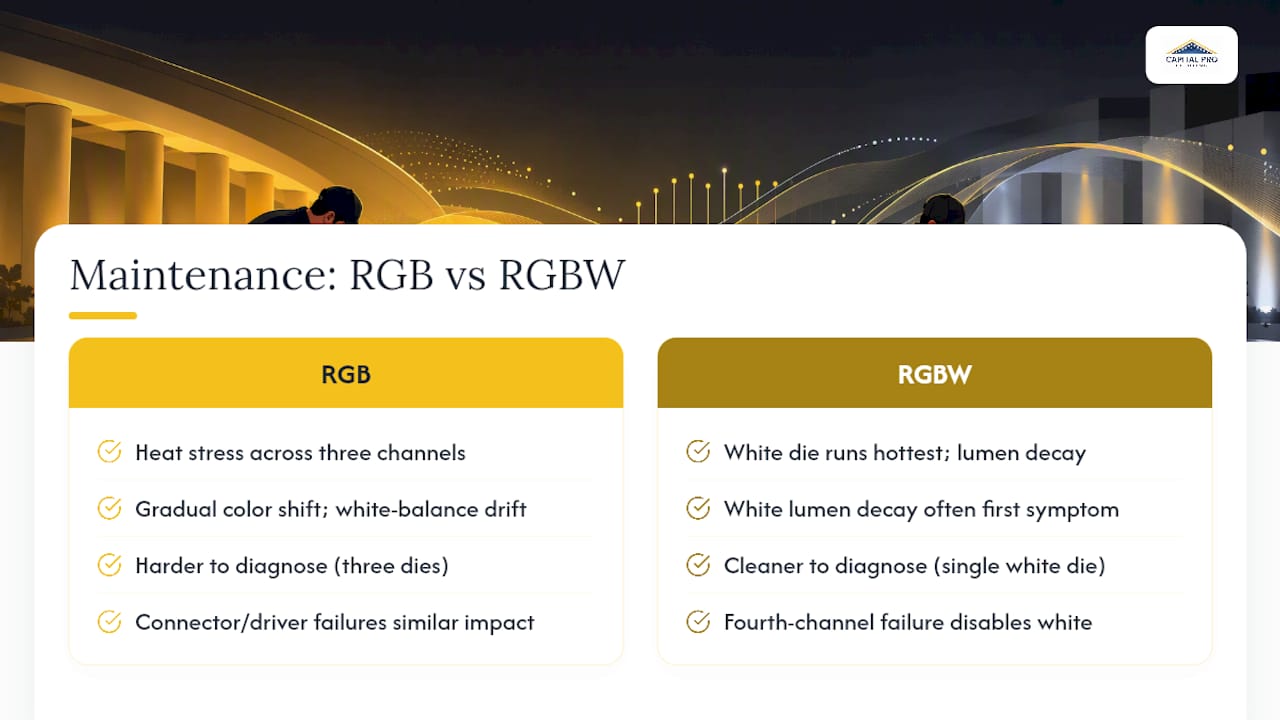
RGB fixtures tend to fail through cumulative heat stress across three simultaneously driven channels, especially in installations that run white-approximated scenes often despite being RGB-only hardware. Because all three color dies work harder to fake white, they age faster than they would in a fixture reserved purely for saturated color use. The most common RGB failure is gradual color shift, where one channel decays faster than the others and white balance drifts even before any diode fully fails.
RGBW fixtures shift the maintenance conversation toward the white die specifically. Because it often runs hottest in daily white-heavy use, it is frequently the first component to show measurable lumen decay in a four-die package. The upside is that a single white die failing is usually a cleaner, more diagnosable problem than the three-way color drift that plagues RGB systems, since you are troubleshooting one component instead of balancing three.
Connector and driver failures affect both systems roughly equally, but RGBW systems carry a slightly higher stakes profile per failure: a bad connection on the fourth channel disables white entirely on that fixture, which is more noticeable on a permanent installation than a flickering color channel might be.
For anyone specifying a permanent installation, this is the practical argument for lifetime parts coverage on track-based systems. Individual diode failures, whichever color or white channel is affected, get far less expensive to resolve when parts replacement isn’t a separate line-item cost years into ownership.
How Capital Pro Lighting Decides Between RGB and RGBW
After more than a decade installing permanent lighting across the Capital Region, Capital Pro Lighting defaults to RGBW on almost every roofline and facade project, since RGBW is the standard for installations needing both daily white light and event color. A good practice is to start with sample fixtures on-site to confirm CCT and CRI before ordering a full run, then design a controller and channel plan based on the property’s layout. The decision tree stays simple: if a homeowner wants usable white light every night, RGBW wins. If the goal is seasonal color only, standard RGB can still make sense, backed by custom 3D-printed brackets for a clean finish either way.
— Luis T
Sources
- RGB vs RGBW LED stage lights — pros and use cases
- What’s the difference between RGB and RGBW LED strip lights? - Benwei Lighting
- Not all RGBW is the same — LED2024 presentation
- RGB vs RGBW wall washers: control, white light and cost
FAQ
What Are the Disadvantages of RGB LED Lighting?
RGB lighting struggles to produce accurate white light because it blends three narrow-spectrum colors instead of using a dedicated white emitter, which lowers CRI and can leave whites looking tinted. It also draws more power to approximate white, since red, green, and blue channels all have to run simultaneously.
What Are the Two Types of RGB LEDs?
The two common formats are RGB LEDs with three separate dies for color-only output, and RGBW LEDs that add a fourth dedicated white die. Within RGBW, some manufacturers use a 4-in-1 quad chip while others place a discrete white LED next to the RGB emitters, and each affects color mixing differently.
Is RGB LED as Good as OLED?
RGB LED and OLED serve different purposes and are not directly comparable. RGB LED refers to lighting fixtures and strips that mix red, green, and blue light for color effects, while OLED is a display technology used in screens; the RGB vs RGBW comparison in this article concerns lighting fixtures, not screens.
What Are the Key Differences Between RGB and RGBW Controllers?
RGB controllers send three channels of signal per pixel, while RGBW controllers send four to control the added white emitter. This changes pixel counts per DMX512 universe and means an RGB controller cannot activate an RGBW fixture’s white channel without a firmware or hardware upgrade.
Ready for a Brighter Home?
Free, no-pressure quotes across the Capital Region.
No obligation. Local installer. Same-day callback.
Reviewed by Capital Pro Lighting
Capital Pro Lighting installs permanent outdoor lighting, architectural lighting, and holiday lighting across Albany and New York's Capital Region. We install UL listed permanent lighting systems and have 10 years in business. More about our team.


